- Kotlin 79.7%
- TypeScript 11.4%
- SCSS 4.7%
- HTML 3.1%
- Java 0.5%
- Other 0.3%
| Filename | Latest commit message | Latest commit date |
|---|---|---|
 ce8f656040
- [x] I have read the [contributing guidelines](https://github.com/iamgio/quarkdown/blob/main/CONTRIBUTING.md). - [x] I have tested the changes locally. - [ ] An issue for this change exists, and it was discussed with maintainers. This is required for new features and non-trivial changes. If present, append `Closes #ISSUE_NUMBER` at the end of this PR description. - [x] (Optional) I have added necessary documentation to [`docs`](https://github.com/iamgio/quarkdown/tree/main/docs) and [`CHANGELOG.md`](https://github.com/iamgio/quarkdown/blob/main/CHANGELOG.md) <!-- This is an auto-generated comment: release notes by coderabbit.ai --> ## Summary by CodeRabbit * **New Features** * Create projects from packages that provide templates using `quarkdown create --template`. * Templates can specify a document type, starting content, and additional files. Their document type and theme settings are used when generating a project unless overridden. * The CLI supports `docs` as a project type and can prompt for a document type when needed. * Project creation supports shared setup includes and optional page counters. * **Documentation** * Added guidance for creating projects from templates and declaring template packages. <!-- end of auto-generated comment: release notes by coderabbit.ai --> |
||
| .github | ||
| .run | ||
| build-logic | ||
| demo | ||
| docs | ||
| gradle | ||
| mock | ||
| quarkdown-cli | ||
| quarkdown-core | ||
| quarkdown-core-test-fixtures | ||
| quarkdown-html | ||
| quarkdown-html-pdf | ||
| quarkdown-install-layout-navigator | ||
| quarkdown-interaction | ||
| quarkdown-libs | ||
| quarkdown-locale-table-processor | ||
| quarkdown-lsp | ||
| quarkdown-markdown | ||
| quarkdown-native-library-annotations | ||
| quarkdown-native-library-processor | ||
| quarkdown-package-manager | ||
| quarkdown-plaintext | ||
| quarkdown-quarkdoc | ||
| quarkdown-quarkdoc-reader | ||
| quarkdown-server | ||
| quarkdown-stdlib | ||
| quarkdown-template | ||
| quarkdown-test | ||
| scripts | ||
| skills/quarkdown | ||
| .dockerignore | ||
| .editorconfig | ||
| .gitattributes | ||
| .gitignore | ||
| build.gradle.kts | ||
| CHANGELOG.md | ||
| CLAUDE.md | ||
| CONTRIBUTING.md | ||
| Dockerfile | ||
| gradle.properties | ||
| gradlew | ||
| gradlew.bat | ||
| LICENSE | ||
| README.md | ||
| settings.gradle.kts | ||
| SPONSORS.md | ||
| version.txt | ||



Table of contents
- About
- Demo
- Editor extensions
- Targets
- Comparison
- Getting started
- Mock document
- Contributing
- Sponsors
- Concept
- License
About
Quarkdown is a modern Markdown-based typesetting system designed for versatility. It allows a single project to compile seamlessly into a print-ready book, academic paper, knowledge base, or interactive presentation. All through an incredibly powerful Turing-complete extension of Markdown, ensuring your ideas flow automatically into paper.
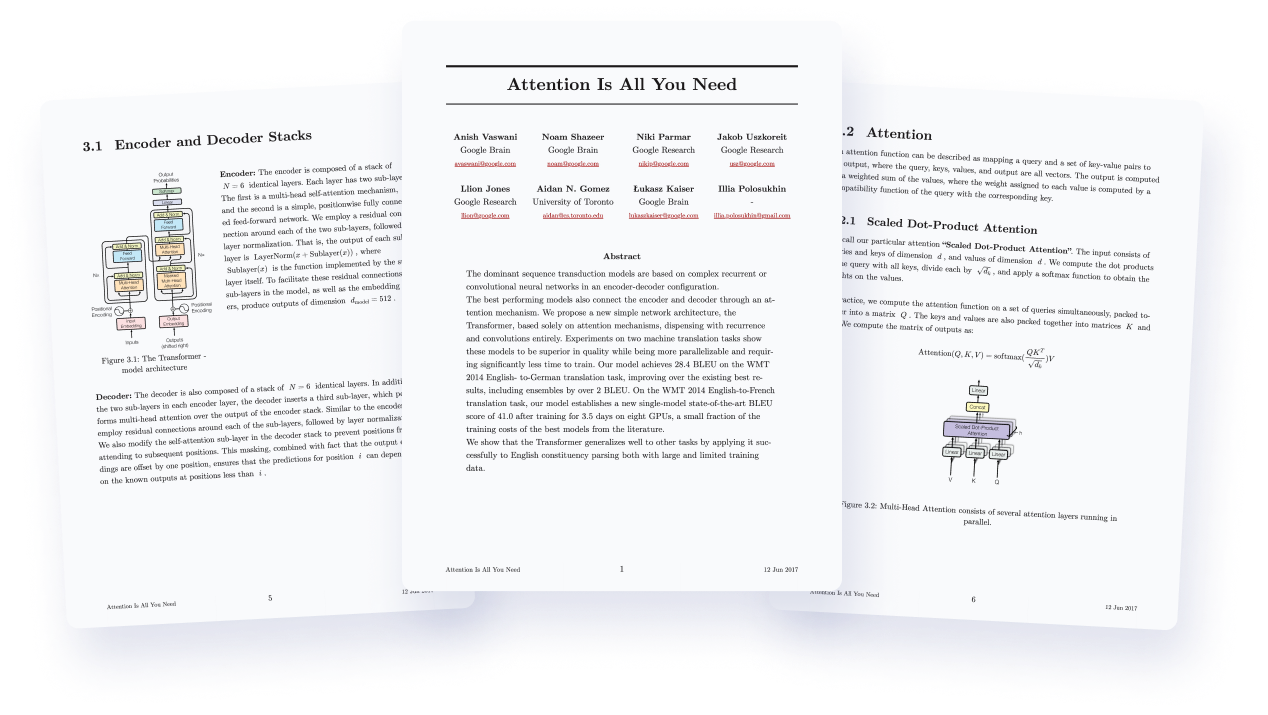
Original credits: Attention Is All You Need
Born as an extension of CommonMark and GFM, the Quarkdown Flavor brings functions to Markdown, along with many other syntax extensions.
This is a function call:
.somefunction {arg1} {arg2}
    Body argument
Possibilities are unlimited thanks to an ever-expanding standard library, which offers layout builders, I/O, math, conditional statements and loops.
Not enough? You can still define your own functions and variables, all within Markdown. You can even create awesome libraries for everyone to use.
.function {greet}
    to from:
    **Hello, .to** from .from!

.greet {world} from:{iamgio}
Result: Hello, world from iamgio!
This out-of-the-box scripting support opens doors to complex and dynamic content that would be otherwise impossible to achieve with vanilla Markdown.
Combined with live preview, ⚡ fast compilation speed and great editor support, Quarkdown simply gets the work done, whether it's an academic paper, book, knowledge base or interactive presentation.
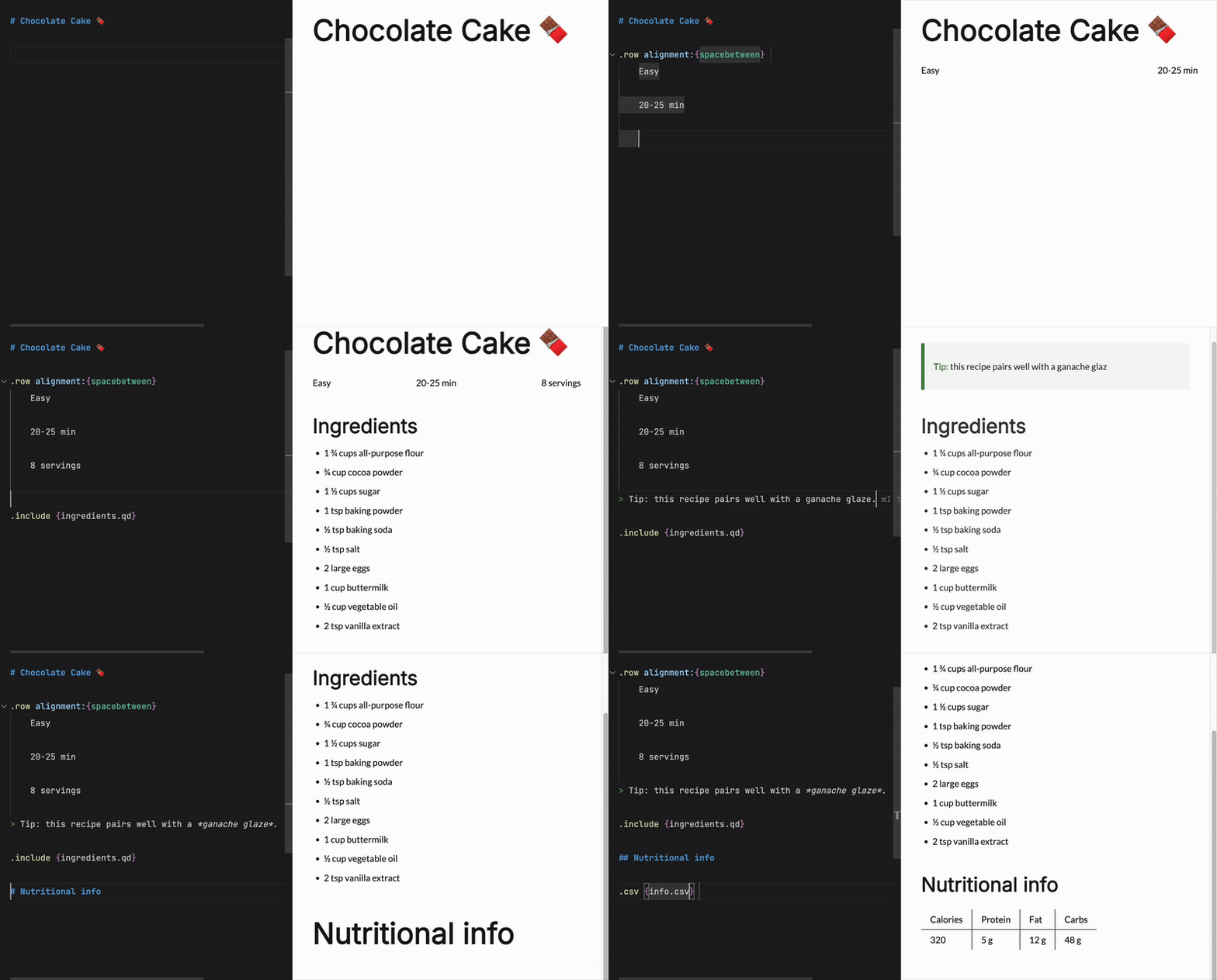
In a nutshell, Quarkdown is...
- Familiar: built on the well-known Markdown syntax, for a flat learning curve
- Elegant: produces output that matches the quality of industry-leading tools
- Agent-friendly: comes with a built-in skill for idiomatic fluency of your coding agents (read the eval)
- Customizable: full control over document layout, aesthetics, and properties
- Secure by default: a restrictive permission system limits access to system resources
- Versatile: a single source compiles to multiple targets
- Reactive: low-latency live previews for rapid iteration. The official wiki (100+ subdocuments) compiles in ~2 seconds
- Reusable: repeated content can be turned into one-line function calls
- Easily deployable: set a CD workflow up in under 3 minutes (example)
Looking for something?
Check out the wiki to get started and learn more about the language and its features!
As simple as you expect...
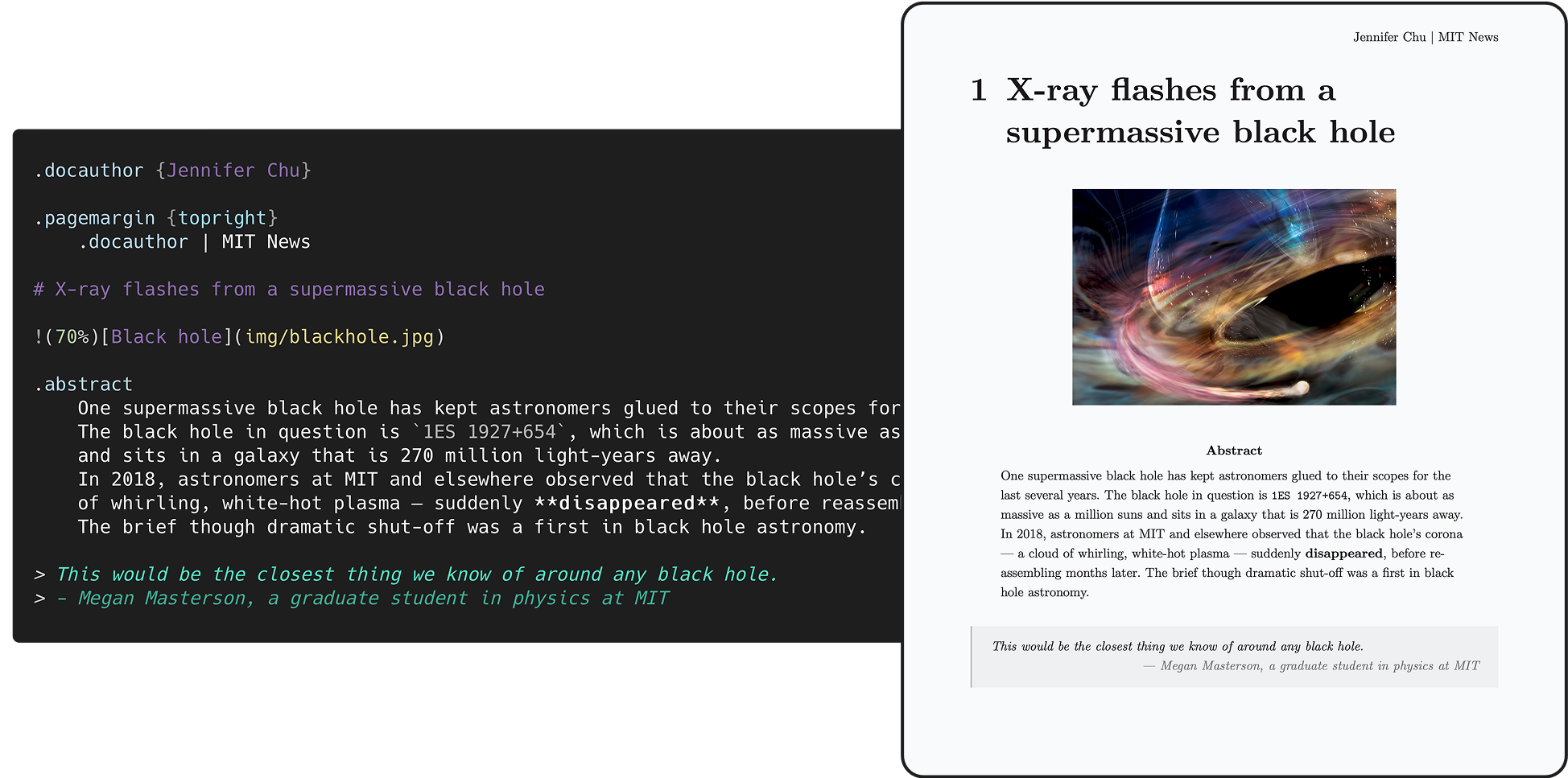
Inspired by: X-ray flashes from a nearby supermassive black hole accelerate mysteriously
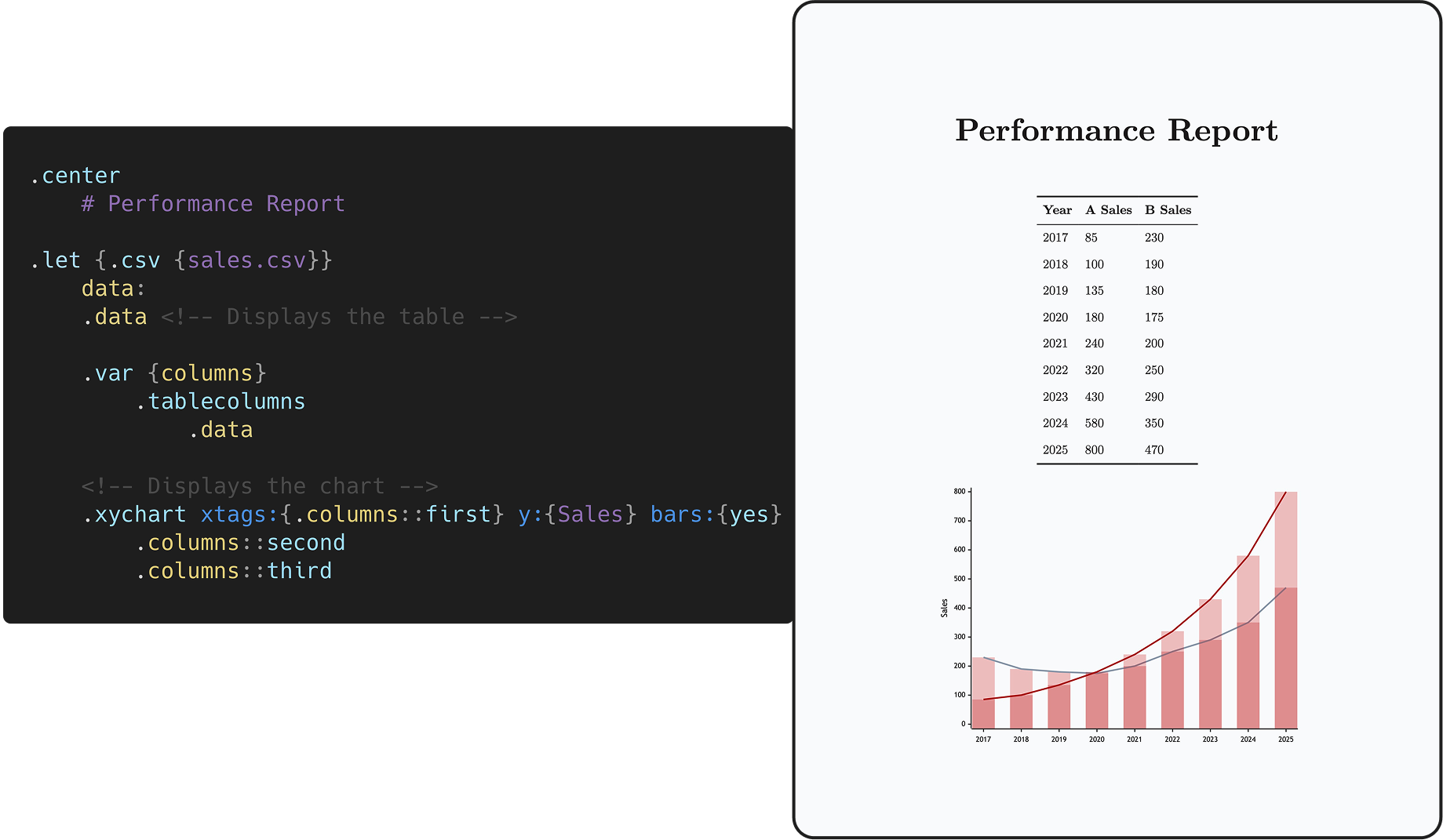
...as complex as you need.
Editor extensions
- VS Code
- IntelliJ IDEA (unofficial by @CarmJos)
Targets
-
HTML
-
Plain
Continuous flow like Notion/Obsidian, perfect for static websites and knowledge management - check out the author's personal website. -
Paged via paged.js
Perfect for papers, articles and books - check out the demo document. -
Slides via reveal.js
Perfect for interactive presentations. -
Docs
Perfect for wikis, technical documentation and large knowledge bases - check out Quarkdown's wiki.
-
-
PDF
- All document types and features supported by HTML are also supported when exporting to PDF.
-
Markdown
- GFM export.
-
Plain text
The desired document type can be set by calling the .doctype function within the source itself:
.doctype {plain}(default).doctype {paged}.doctype {slides}.doctype {docs}
Comparison
| Quarkdown | LaTeX | Typst | AsciiDoc | MDX | |
|---|---|---|---|---|---|
| Concise and readable | ✅ | ❌ | ✅ | ✅ | ✅ |
| Full document control1 | ✅ | ✅ | ✅ | ❌ | ❌ |
| Scripting | ✅ | Partial | ✅ | ❌ | ✅ |
| Book/article export | ✅ | ✅ | ✅ | ✅ | Third-party |
| Presentation export | ✅ | ✅ | ✅ | ✅ | Third-party |
| Static site export | ✅ | ❌ | Experimental | ✅ | ✅ |
| Docs/wiki export | ✅ | ❌ | ❌ | ✅ | ✅ |
| Learning curve | 🟢 | 🔴 | 🟠 | 🟢 | 🟢 |
| Targets | HTML, PDF, MD, TXT | PDF, PostScript | HTML, PDF | HTML, PDF, ePub | HTML |
| LaTeX | Quarkdown |
|---|---|
|
|
Getting started
Installation
Install script (Linux/macOS)
curl -fsSL https://raw.githubusercontent.com/quarkdown-labs/get-quarkdown/refs/heads/main/install.sh | sudo env "PATH=$PATH" bash
Root privileges let the script install Quarkdown into /opt/quarkdown and its wrapper script into /usr/local/bin/quarkdown.
The browser required for PDF export is installed automatically.
For more installation options, check out get-quarkdown.
Homebrew (Linux/macOS)
brew install quarkdown-labs/quarkdown/quarkdown
Install script (Windows)
irm https://raw.githubusercontent.com/quarkdown-labs/get-quarkdown/refs/heads/main/install.ps1 | iex
Scoop (Windows)
scoop bucket add quarkdown https://github.com/quarkdown-labs/scoop-quarkdown; scoop install quarkdown
GitHub Actions
See setup-quarkdown to easily integrate Quarkdown into your GitHub Actions workflows.
Manual installation
Instructions for manual installation
Download quarkdown.zip from the latest stable release and unzip it,
or build it with gradlew installDist.
Optionally, adding <install_dir>/bin to your PATH allows you easier access Quarkdown.
Requirements:
- (Only for PDF export) A Chromium-family browser, such as
chrome-headless-shell. See PDF export for details.
Quickstart
New user? You'll find everything you need in the Quickstart guide to bring your first document to life!
Creating a project
quarkdown create [directory] will launch the prompt-based project wizard, making it quicker than ever
to set up a new Quarkdown project, with all metadata and initial content already present.
Compiling
Running quarkdown c file.qd will compile the given file and save the output to file.
If the project is composed by multiple source files, the target file must be the root one, i.e. the one that includes the other files.
If you would like to familiarize yourself with Quarkdown instead, quarkdown repl lets you play with an interactive REPL mode.
Options
The most commonly used options are:
-
-por--preview: enables automatic content reloading after compiling. -
-wor--watch: recompiles the source every time a file from the source directory is changed.
Tip
Combine
-p -wto achieve live preview!
--pdf: produces a PDF file. Learn more in the wiki's PDF export page.
For the full list of options, check out the CLI options wiki page.
Mock document

Mock, written in Quarkdown, is a comprehensive collection of visual elements offered by the language, making it ideal for exploring and understanding its key features — all while playing and experimenting hands-on with a concrete outcome in the form of pages or slides.
- The document's source files are available in the
mockdirectory, and can be compiled viaquarkdown c mock/main.qd -p. - The PDF artifacts generated for all possible theme combinations are available and can be viewed in the
generatedrepo.
Contributing
Contributions are welcome! Please check CONTRIBUTING.md to know how contribute via issues or pull requests.
Sponsors
A special thanks to all the sponsors who supported this project!



Concept
The logo resembles the original Markdown icon, with focus on Quarkdown's completeness, richness of features and customization options, emphasized by the revolving arrow all around the sphere.

What could be mistaken for a planet is actually a quark or, more specifically, a down quark, an elementary particle that is a major constituent of matter: they give life to every complex structure we know of, while also being one of the lightest objects in existence.
This is, indeed, the concept Quarkdown is built upon.
License
By default, Quarkdown and its modules are licensed under GNU GPLv3, except for modules that include their own LICENSE file:
the CLI (quarkdown-cli) and Language Server (quarkdown-lsp) modules and binaries are licensed under GNU AGPLv3.
Footnotes
-
The ability to customize the properties of the document and of its output artifact through the language itself. ↩︎